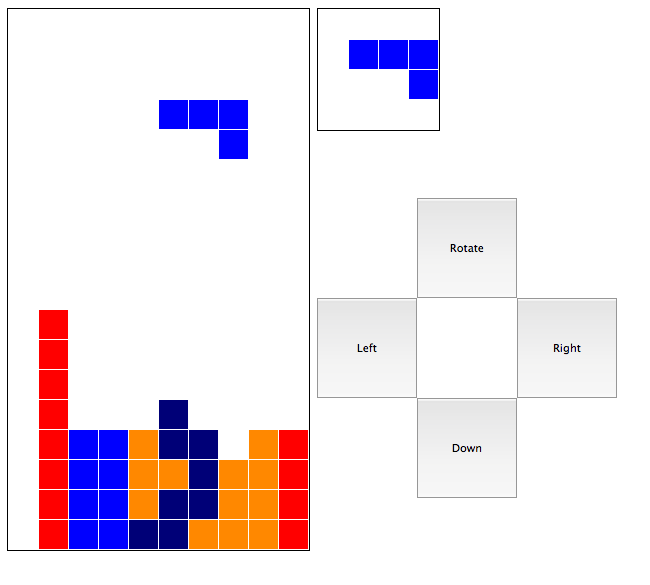
I decided that my Pacman4Console days are behind me. Now it's all about HTML5. I decided to see how quickly I could make a Tetris clone that could be played on virtually any web-capable device. It took me 2 hours and change, and it's 293 lines of code (JS + HTML + CSS + comments). It's Tetris Under Three. Sorry, it doesn't keep score, the block rotation is a little funky, and it never progresses in speed, but that would add another 7 lines at least, and we can't have that.
After spending hundreds of dollars on prototype
material, tools and hardware, I decided to document the
final pieces I used for my CNC machine so that it will
save everyone else the time, money, and hassle.
The results of the first board
Update: I got some thinner drill bits on eBay (0.2mm 15deg
engraving bits) - something like five for $12 shipped. I was worried
they might snap but they seem to be very sturdy. They do a much better
job with the tracing than the "tracing bit" sold at Drill Bit City as
shown in the comparison pictures below:
I just wanted to test out the bit in the second picture so the holes
aren't drilled all the way through.
This project started as a joke on my boss and I later found out that a website
sells the item. (Well, I'm not about to pay for it.) All it does is plays a short
burst of sound (~0.5 seconds) every 4-8 minutes (randomly delayed). Hide this puppy
in the boss's office, maybe in a ceiling tile, and he'll go insane all day trying
to find from where the sound is coming.
Hardware: Piezo-electric speaker (able to run on 5V), a PIC 16F88 (and
programmer), 5V regulator, 9V battery, and some wire/solder.
Software: SourceBoost,
Noise Maker Source Code,
Now that I got my CNC machine working and the traces can be narrow, thanks to the smaller engraving bit, I decided to start work on my LED Display. I have been planning this for a long time so I've come up with many features:
An example message would be something like a realtor sign, displayed
inside the window of a house for sale:
Concerns:
There are more concerns, but this will keep me occupied for now. Here is a list of parts that I plan on using:
Here are all the characters I plan to display and how they will look.
I found that for big projects, the stages on my CNC Miller Lite are not large enough -
especially for my LED Sign project. So I am building a new CNC Miller. The x/y stage travel
distance will be ~2.5ft (figure the Y stage is half that because physics can be a big pain
sometimes) which should be good for cutting wood stuff too. I haven't put much time
into it so far, but here's the image I took after getting some of the pieces cut.

I decided to make the frame out of poly cutting boards because they're easy to get, easy to cut,
and very sturdy. I ordered three unfinished 0.75x24x30 inch cutting boards (but I'll probably have
to order one more) from FreckleFace.com
for $200 shipped, traced out the pieces I would need (Apologies, I do not have the
dimensions/pictures of the traced boards but you can use the
Google Sketchup model to measure the pieces needed.)
and cut them with a table saw.
There are two features I'm planning on implementing that will be VERY useful:
1) An attached webcam zoomed/centered on the spindle drill bit - for easily
aligning the spindle
2) A nozzle mount for a *very* small wet/dry vac - I'll probably put it on
the same relay as the spindle on/off
so that anytime the spindle is spinning, the vacuum will be sucking up the debris
I plan to work on it quite a bit in a couple weeks so I'll have some pictures to post at that time.
Since the whole LED Display is put on hold until I make the CNC Miller V2, I decided to just buy an
LED sign and make an interface for it. I found an LED Marquee
Sign from Office Depot and found out the protocol it used to display the messages, then wrote a
quick PIC program to let me display pre-programmed messages (up to 12 messages) with the press of a
button. My goal is to mount it in my car so I can flash messages to people behind me like
"YOU SUCK AT DRIVING!" Here's a video of the interface before I milled the board:
Components:
Software:
SourceBoost,
PIC Source Code,
PIC Support Source Code,
PIC Support Header File
I just milled the board so here's what it looks like, (I used pull-down instead of pull-up because
there's no power constraints here, and it makes more sense in my head):


My hope is to bring it all into the shop tomorrow and get it all put together and installed in my car, at which time I'll post pictures.